
ReasoningCampus · SHL Numerical Reasoning
SHL interactive numerical practice adds a response-entry check to the calculation. Work out the correct value, place it accurately and check what will be submitted. The local chart exercise below is an original learning tool, not a reproduction of SHL’s assessment interface. ReasoningCampus uses these original exercises to teach accurate chart entry as part of independent SHL preparation.
Independent learning resource · English · Content revised 16 October 2026
View full preparationSHL interactive numerical practice: calculate, enter, verify
At ReasoningCampus, we use read, transform, enter, verify. Read the source units, transform the values into the requested quantity, enter that quantity and verify the final state. This protects against solving the mathematics correctly but moving a control to a different value or using the wrong scale.
Percentages: turn counts into shares
| Channel | Orders | Share of total |
|---|---|---|
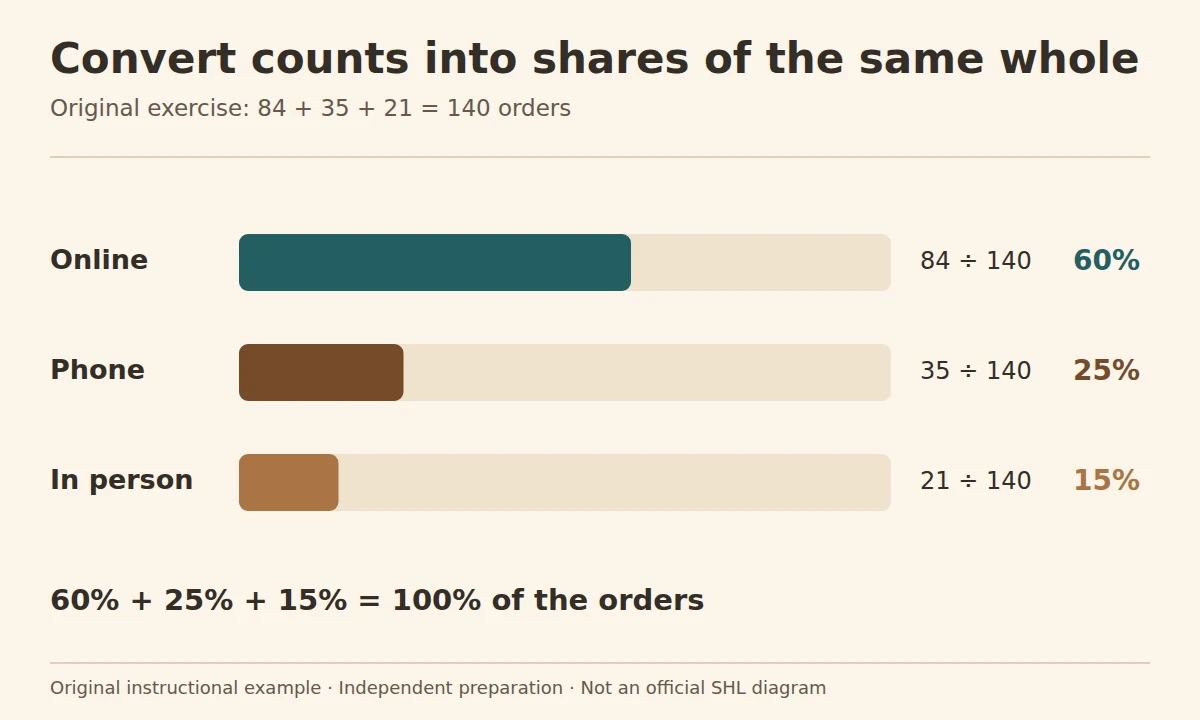
| Online | 84 | 84 ÷ 140 = 60% |
| Phone | 35 | 35 ÷ 140 = 25% |
| In person | 21 | 21 ÷ 140 = 15% |
| Total | 140 | 100% |
To represent these orders in a percentage chart, first add the counts: 84 + 35 + 21 = 140. Divide each channel by 140. Enter 60, 25 and 15 if the controls ask for percentages on a 0–100 scale. Do not enter 84, 35 and 21; those are counts. If the task asks for proportions on a 0–1 scale instead, use 0.60, 0.25 and 0.15.
The total of 100% is a useful check because the three categories exhaust the stated total. It would not be a valid assumption if the categories overlapped or if the question omitted part of the population.
Units: read the chart back into a table
Suppose a labelled bar chart reports 48, 60 and 72 units for three periods. Read the axis scale before copying the values. If the axis is labelled “thousands”, the underlying quantities are 48,000, 60,000 and 72,000. The growth from the first to the third period is (72 − 48) ÷ 48 = 50%; the common thousand-unit scale cancels in this ratio.
For an absolute increase, however, the scale does not disappear: the increase is 24,000 units. A percentage and a count are different output types.
Chart entry: check the response you are submitting
| Check | Why it matters |
|---|---|
| Unit and scale | 60% differs from 60 orders and 0.60 |
| Rounding instruction | Whole numbers and one decimal place differ |
| Control state | The displayed value should match your intention |
| Total or constraint | Entries may need to satisfy a stated sum |
| Submission | Follow the actual confirmation instructions |
Use the precision and input rules stated in the task. A bar that looks close may still represent the wrong value, so check the number displayed by the control before submitting.
What interactive adds — and what this exercise does not claim
The 2018 Verify Interactive Numerical Reasoning factsheet describes activity-based tasks involving numerical data and chart or spreadsheet responses. This is more specific evidence for interactive practice than a factsheet for a separately named multiple-choice product.
The chart-entry tool checks three percentages against a stated total. It does not measure cursor behaviour, reproduce an employer’s interface or estimate an SHL score. After calculating, make a final response check: correct field, correct unit, correct total.
Try the original practice tool
Original exercise: 84 online, 35 phone and 21 in-person orders. Enter each share as a percentage of all 140 orders.
The chart-entry checker runs locally in your browser. The source table and worked percentage calculations remain available if JavaScript is unavailable.
Check your understanding: original practice
Calculate the requested quantity before thinking about how to enter it. Compare the alternatives to see which mistake each one represents.
Looking for a structured course alongside these free questions? View full preparation.
Questions about SHL interactive numerical practice
Does every interactive numerical assessment use the same chart?
Follow the tutorial for your assigned assessment. Learn the calculation separately, then practise the response method shown there; one chart example cannot establish the layout or controls of every version.
Should percentages always add to 100?
Only when the categories form a complete, non-overlapping whole. Separate rates, overlapping groups or partial categories need not sum to 100.
Can I enter rounded values?
Use the precision requested. If the instructions do not resolve a problem in a real session, follow the designated clarification or support route.
Sources and scope
The interactive numerical factsheet describes activity-based response entry. It is the relevant source for that product distinction; the local percentage-entry tool remains an original teaching exercise.
Where to go next
Practise data selection with multi-step tables, repair the formula when needed and use a compact scratch layout to reduce entry errors.
